


How to_set up_FPV_drone_filters_and_PID_using_Blackbox
*translation may be a little crooked, but the meaning is clear. And there’s already 73 pages of meaning, with pictures )))
The document describes how to use Blackbox to configure a Betaflight -based fpv drone.
Programs used:
– PIDToolBox as the main tool for setting filters and PIDs,
– Blackbox Explorer – as a helper tool for adjusting [Feedforward] offset and general troubleshooting.
BLACKBOX gives you a complete picture of what’s really going on with your drone, allowing you to unleash its full potential. Things like noise filtering and tiny “flights” can only be clearly seen in a black box.
Let’s admit, the in-depth configuration of PIDs, filters, and recordings in Blackbox is still a little studied topic for our team, so we are taking a lesson for Ukrainian specialists as a basis.
DOWNLOAD AND STUDY
In the near future, we will thoroughly study all the nuances, introduce them into the training program for pilot technicians, and upgrade the lesson, taking into account our experience and knowledge.
Как_настроить_FPV_фильтры_дронов_и_PID_с_помощью_Blackbox.docx
Посмотреть или скачать файл «Как_настроить_FPV_фильтры_дронов_и_PID_с_помощью_Blackbox.docx» https://disk.yandex.ru/i/HvuJb1OvQO3S-g
#fpv_черныйящик
#fpv_blackbox
#fpv_компетенции
#PID_настройки
Blackbox_Explorer.exe, download
A program for viewing data from the “black box” of an FPV drone.
➡️ The black box can show and tell a lot about the drone.
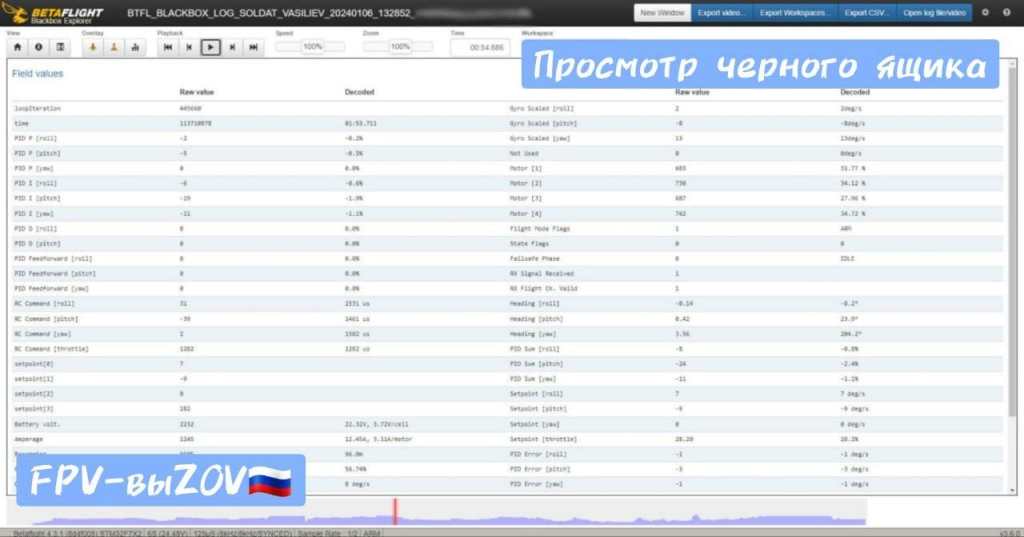
We will talk a lot more about how to read and understand files, and in general “about the black box”, show examples, descriptions, settings, etc.
#fpv_черныйящик
#fpv_blackbox
#fpv_компетенции


You must be logged in to post a comment.