


MILBETA (version 1.23) – firmware for flight controller
Advanced FAILSAFE mode
➡️ All FIALSAFE mode timers have been increased by 10 times .
That is, we write 1 sec – in fact it is 10 sec.
Preparing for the test
1. Set the maximum time before stage 2 is triggered to 200 sec (in Betaflight Configurator we write 20).
2. Stage 2 – fall.
3. When the remote control signal was lost, set the throttle to maximum.
Testing the advanced FAILSAFE mode
1. Started the engines.
2. Turn off the remote control (simulate loss of signal).
3. The engines immediately increased their speed, FIALSAFE was activated – full throttle.
4. After 200 seconds ( 3 min 20 sec ) stage 2 was triggered – fall, the motors turned off.
📎All declared capabilities of MILBETA , flight controller firmware
+ are for those confirmed by tests.
MILBETA (version 1.23) – firmware for the flight controller.
*does not require a license, opens up a number of useful opportunities.
✅ Firmware capabilities (how it differs from the standard one), declared :
1. OSD camouflage to hide the launch and landing site. +
2. Displaying the toggle switch position on the OSD screen. +
3. Direction finding of electronic warfare on OSD (glasses screen). Display of electronic warfare and LQ statistics by frequencies on OSD. +
*function (3) works only in synergy with MILERLS firmware.
4. Advanced FAILSAFE mode (+)
5. The frequency restrictions of the video transmitter have been removed . –
To be able to change the channel via Betaflight Configurator .
The standard one supports frequencies from 4900 to 5999 MHz.
MILBETA states – from 3000 to 6999 MHz.
6. Display of EW and LQ statistics by frequencies on OSD +
*function (6) works only in synergy with MILERLS firmware.
⚠️ All the functionality of the MILBETA firmware is used by opponents in synergy with the MILELRS firmware (a unique key for the transmitter is required).
Firmware MILERLS opponents
# MILELRS
We took apart the instructions and collected several trophies .
Possibilities :
1. Work in two ranges simultaneously (on one receiver). Example: half of the packets 750-760 MHz, the second half 950-960 MHz
2. Changing frequencies from the remote control (in lua script).
3. There are no specified ranges , in the settings you need to specify the beginning and end of the range yourself.
4. Duplication of communication in several parallel ranges – 433/900/2400 MHz.
5. Connecting multiple receivers to the flight controller and multiple transmitters to the remote control.
*maybe you need a separate LUA script for the remote control.
6. FailSafe mode – automatic switching between several parallel ranges when one of them is jammed. For example, between 900 and 2400 MHz.
7. ELRS backback technology .
Switching video channels on the video receiver and video transmitter via the remote control.
*must be supported by equipment (video receiver with ELRS module).
8. Separate channel for telemetry .
9. Added new frequencies for exchanging control packets (84 Hz, 42 Hz, 24 Hz, 14 Hz).
* standard 25Hz, 50Hz, 100Hz, 200Hz.
10. There is a frequency scanner for receivers in the drone and transmission to the remote control.
11. Removed bind phrase – replaced with unique RX_KEY/TX_KEY, created separately for each firmware.
This firmware of opponents contains really interesting functionality .
⚠️ While MILBETA is not available – use MILBETA firmware (for flight controller),
➡️ Instructions translated, published:
– instructions
– MULTI_BAND functionality
⚡Firmware MILERLS opponents
– no license is required to flash the receiver;
– no license is required to flash the transmitter, but for each transmitter it is necessary to generate a unique key for the bind with the receiver on MILERLS.
Without a key, binding is not possible.
Betaflight-configurator_10.10.0 (desktop) and 11.0.0.
Download betafly
– for Windows (on computer) 10.10.0
– for android (on phone) 10.10.0
– online version ( online configurator, follow the link ) 11.0.0.
1. Classic version (software for Windows).
Installed on a computer (Windows), contains all the functionality.
2. Mobile version (download for Android).
Almost completely replaces the desktop version of the program, with one exception:
In the mobile version, it is not possible to reflash the flight controller.
* Why do you need to reflash the flight controller:
– when the servos are not connected from the factory.
– when there are errors in the flight controller, you can try to fix it by reflashing the firmware.
These are quite rare cases, so you can safely consider the mobile version of the Betaflight program as a working solution infield conditions.
3. Online configurator (link) .
Does not require installation of the program on the device (PC, Android).
Requires internet connection.
Review of OnLine Betaflight Configurator here.
In short, if you have no problems connecting to the Internet, then this is your choice.
Optimal firmware and software for DJI Mavic 3 (M3)
1. 1001 from Russian Hackers (on drone) , free
❗️The current version of firmware 1001 is 1.0.45 , don’t forget to update.
Flashing options and instructions here , briefly below:
– DRONE ID, OpenDroneId, NFZ disabled;
– added the “Antispoofing, quick takeoff without GPS” mode, FCC is activated on the drone itself;
– all limits and restrictions on range and altitude (up to 10 km) have been removed, regardless of location on the map;
– added the ability to automatically take off the drone to a height of 2000, 1000, 500, 300, 200 or 100 meters in the event of loss of connection with the remote control (escaping from electronic warfare);
– the function of recording and storing flights has been removed – flight trajectories cannot be extracted from the drone;
– return of the drone using a compass when connection with the remote control is lost;
– the ability to use non-native batteries with a capacity of more than 6300 mAh;
– and much more.
2. GlаZ Lite (for tablet/phone) , free license
Current version 1.6.8 (don’t forget to update)
❗️ Screencast available
3. COS (for smart remote control), paid license
Allows you to use one remote control for different types of drones (+ there is a screen broadcast )
* can only be used on RC plus, RC pro, RC remote controls.
** to prevent COS from conflicting with the “Eye Light” software, set “eye” to “yes” when registering.
4. Unlinking from the remote control (account) , free of charge
Unbind from “Russian Hackers” (for phone or smart remote control), unbinds the drone from the remote control. You can use any suitable remote control without restrictions on 5 flights.
More details here
A controversial point, since the drone could end up in the hands of opponents.
➡️ We also recommend for M3 :
– check and fly the drone after flashing;
– print and include instructions for the operators of these drones;
– complete with spare batteries and a hub for multi-charging;
– complete with spare propellers.
✔️Lifehack: the M3 body alone costs less than the standard and combo sets *surely every operator has a handful of RS-N1 remotes.
Firmware registry for DJI drones
Optimal set of firmware and software for M3T
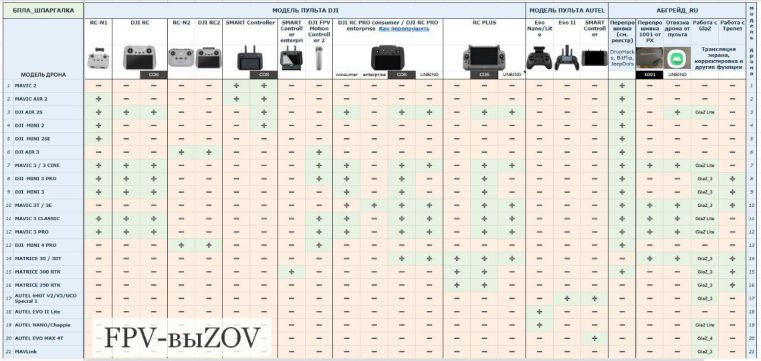
UAV Cheat Sheet


You must be logged in to post a comment.